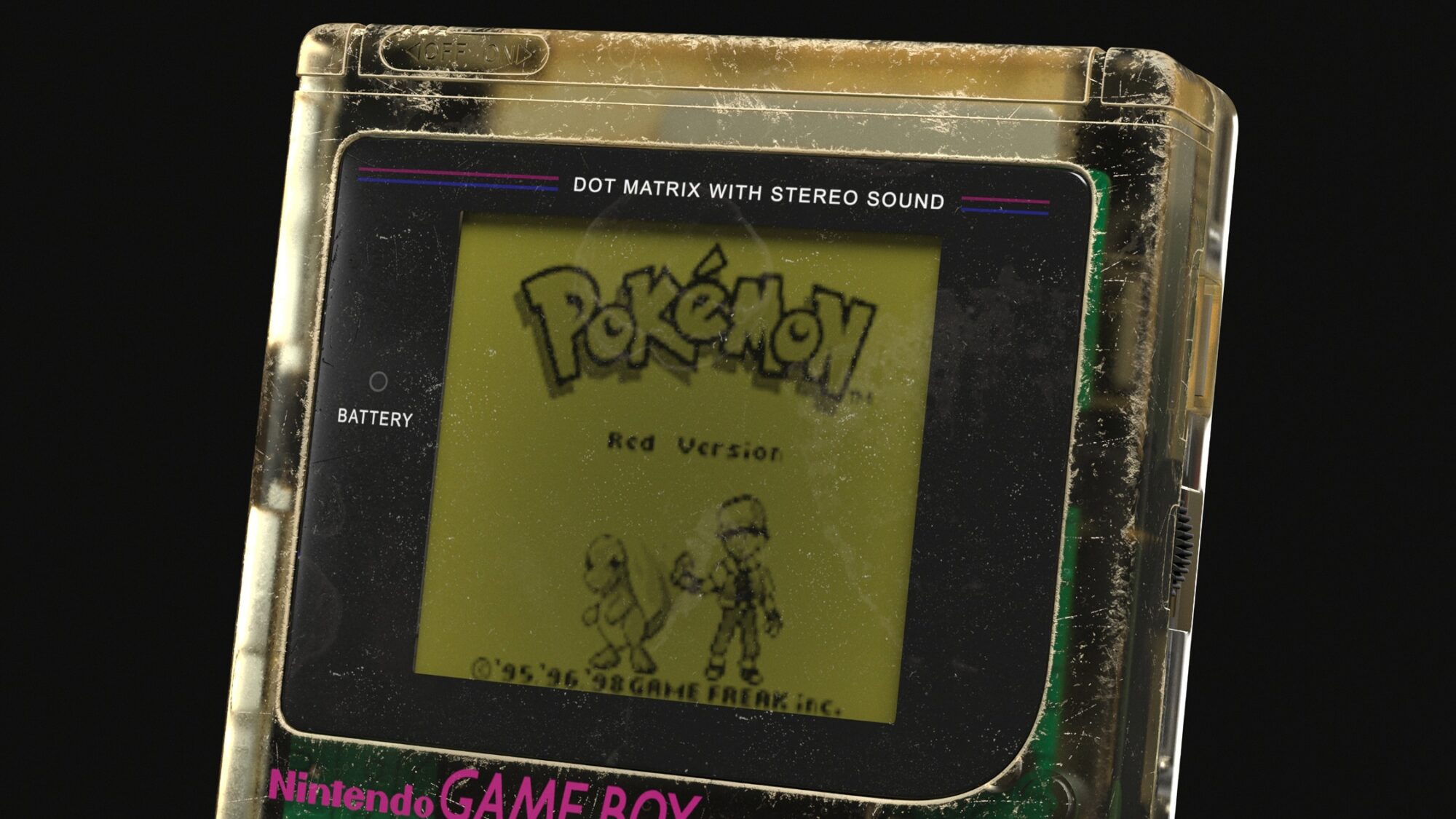
Retro Console



Introduction
Hey everyone, I'm Abhishek Dhiman, and I'm here once again. I'm a 3D Artist from India. I am fascinated by games and have always wanted to be a Game Designer. I am happy to have started my journey as a 3D Artist.
I graduated from university with a specialization in Game Designing. I began working professionally in the Game Industry in 2020 and have contributed to various projects over the last four years.
I specialize in creating Weapons and Props for Games.
Goals
Originally, this project began as a practice exercise to experiment with modeling techniques. However, as I progressed, I shared my work with colleagues, who motivated me to continue and provided ideas for further improvements.
This encouragement led me to explore other processes such as UV mapping, texturing, lighting, and rendering.
Inspiration & References
There’s a small story behind starting this project. While I was ill and instructed by my doctor to take bed rest for a few weeks, it was difficult to remain idle all day.
So, I picked up my laptop, started surfing the internet, and stumbled upon a website called Android Arts.


There, I found some amazing concepts of retro-style consoles and gadgets with a modern, sci-fi twist. Inspired by these designs, I began gathering references and decided to recreate them in my own style.
Initially, I only wanted to work on the modeling phase, but after showing my progress to friends and colleagues, they encouraged me to complete the entire pipeline, including UV mapping, texturing, and rendering.


Summary & Creative Tips
Below are some tips on each section before I get started!
Modelling
Start by collecting diverse references from all necessary angles to ensure accurate proportions and details. Combine real-life references with concept elements for a unique and authentic model.
Add your own design touches to make the model personal.
Creative Tip: Keep your model fresh by incorporating contrasting design elements from different eras or styles. For example, blending modern materials with vintage shapes can result in a striking hybrid design.
Texturing
Focus on close-up references to capture material subtleties. Instead of replicating exact matches, use similar material samples for a realistic look. Photographing materials around you can help build a personal texture library.
Creative Tip: Add slight imperfections such as smudges, scratches, or subtle color variations to make textures feel more “lived-in.”
Organization
Organize your references into thematic or functional groups for easy access. This streamlines the creative process and keeps you inspired.
Creative Tip: Group your references by color schemes, materials, or stylistic influences. This can help you discover new design ideas and match colors effectively during texturing.
Software Used
- Autodesk Maya (Modeling)
- Rizom UV (UV Unwrapping and Packing)
- Substance Painter (Baking and Texturing)
- Quixel Bridge (Texturing Resources, Scene Composition Fillers)
- Marmoset Toolbag 5 (Lighting and Rendering)
- Adobe Photoshop (Image Renders and Composition)
- Wondershare Filmora (Video Composition)
Remember: Great art can be achieved with any tool; it’s how you use them that matters!
Blockout & Modelling
So, here we go! I started by modeling a detailed console, followed by two types of cartridges, controllers, and a joystick. Every element was fully detailed, following a mid-poly workflow, meaning all details were modeled in the mesh rather than baked.
My process:
- Console
- Cartridges and chips
- Joystick
- Controllers
Wires were planned for the final rendering phase.
During modeling, I focused on proper proportions and realistic scales. Extra attention was given to curves and cylindrical details to ensure no low-poly artifacts were visible.


Checklist for Maya Users
- Proper naming and grouping alignment.
- Run Cleanup to resolve hidden errors like lamina faces and non-manifold geometry.
- Avoid N-gons in the mesh.
- Ensure the model aligns with the grid.
- Clear file history.
- Reset transform values to (0, 0, 0).
- Clean up DAG objects.
- Remove unnecessary materials in the hypershader.
- No extra UV sets unless intentionally used.

UV Mapping & Baking
I used Rizom UV for unwrapping and packing, which felt like playing Tetris with 3D models. Proper UV layout ensures efficient texturing later.
My UV plan included five sheets:
- Console: 4K sheet, 120 td/px
- Joystick: 2K sheet, 116 td/px
- Cartridges: 2K sheet, 124 td/px
- Chip connectors and wires: 1K sheet, 115 td/px
- Controllers: 2K sheet, 118 td/px
Tips for Effective UV Unwrapping
- Scale models correctly before packing.
- Place seams in less visible areas.
- Maintain consistent texel density.


Texturing
I began texturing by setting up lighting, display, and shader settings for optimal results.


My texturing approach begins with creating a base material that accurately represents real-life material—such as plastic or wood—by applying a base color with an appropriate roughness value.
Then I add minor height details and introduce subtle roughness variations to enhance realism.
A key tip is to reference similar materials, rather than the same asset, to gather a variety of details that can be applied during texturing. The usage aspect of your model tells a story about its history and context, enhancing its appeal.
My process includes several steps:
- Base Materials + Height Info. : This component encompasses all essential attributes, including the base color, height, roughness, and metallic values. These foundational parameters are crucial for establishing the overall appearance and realism of the material, serving as the groundwork for more detailed texturing work.
- Decals: Adding creative elements like logos, labels, and markings based on references.
- Surface Details: This aspect involves adding subtle information related to roughness and implementing a usage pass. These elements work together to break up lighting across the surface, enhancing visual interest and realism in the material. By carefully integrating these details, the surface appears more dynamic and engaging.
- Wear + Scratches: In this phase, I begin by applying discoloration, fading, and exposure effects to create an aged appearance. Next, I incorporate textured, salty grunge elements to simulate global scratches and wear.This approach not only adds realism but also tells a story about the asset’s usage and history, enhancing its overall character.
- Dirt: This final step involves adding layers of dust and dirt to the model, enhancing its depth. By carefully applying these elements, I simulate environmental effects that suggest the asset has been used or stored in a particular setting.This detail helps to ground the model in reality and adds to the overall narrative of its usage.
Applying the PBR Validate filter in Substance Painter is crucial for ensuring correct material values by identifying and correcting areas that appear red. This step helps maintain the integrity of the material’s properties.
Post-Texturing Optimization
After completing the texturing process, it’s essential to delete unused resources to optimize the file and enhance performance.

Additionally, capturing images of similar materials can aid in creating usage stencils.
These images can be sourced through your smartphone or online and then converted into alpha masks using Photoshop, allowing for more detailed and realistic texturing.
After texturing, it’s crucial to delete unused resources to optimize the file. I also recommend capturing images of similar materials for creating usage stencils, either through your smartphone or online resources, and using Photoshop to convert these images into alpha masks.

Lastly, I have shared videos demonstrating how i add creative touches to your assets, providing further insight into my texturing process.
Here are some helpful texturing videos.
Rendering & Lighting
So, here the fun begins in Marmoset Toolbag 5 with lighting, as it plays a crucial role in effectively showcasing the work.
Even with exceptional modelling and texturing, poor lighting can diminish the impact of a project, making it less engaging for art lovers.
I also provided my camera and render settings to help enhance your scene/composition.
Experimenting with Lighting: When working with lighting, experimenting with various compositions and setups is crucial for establishing the right mood for your subject.
Rejected lighting setups are a normal part of the process, providing valuable insights into what works and what doesn’t.
I’m sharing some of my rejected renders to demonstrate how this trial-and-error approach is essential for achieving the desired results in lighting and presentation.

Camera and Render Settings
Experimenting with camera and render settings is essential for understanding how different configurations influence your composition.
While I usually rely on the same settings I’ve shared, I’ll explain why these particular settings consistently yield good results.
Below, you’ll find comparisons that highlight their effectiveness in enhancing the overall visual quality of my work.


Scene Setup
In my scene setup, I arranged all the assets on a small wooden table and set the camera angle for the shot. I incorporated supporting elements, such as wires and props, to break up light reflections and enhance the composition.


I experimented with various lighting setups from the same angle and adjusted the placement of supporting assets to improve visual appeal.
Additionally, I created 5-6 variations of the wires and strategically placed them in the scene to fill empty spaces, significantly enhancing the overall look.

Scene Setup Overview
Here is my scene setup, showcasing the overall composition. In the setup images, you may notice some illogical elements, such as floating wire ends.
However, in the final renders, everything is appropriately positioned, as I concentrated primarily on the camera frame, given that it’s not an interactive or playable scene.


Post Processing
Final Touches on Renders and Video: In this process, I applied the final touches to my renders and video outputs from Marmoset.
For image post-processing, I used Photoshop, while Wondershare Filmora was utilized for video rendering. The video includes a brief introduction to my project, interspersed with clips from Marmoset.
I added particle dust effects and a vintage filter in Filmora to achieve a nostalgic, old look for the video. For the rendered images, I used Photoshop mainly to add some dust particles for a textured look and made slight adjustments with the Raw filter to enhance contrast and overall appeal.
Here is the Difference result:


Conclusion
Be confident and take action! You can’t learn everything in a day, but with time, you will master your skills and share your knowledge with others. Nothing is impossible. If you don’t start something, you won’t achieve anything.
However, if you begin and face challenges, you’ll learn a lot from those experiences.
This is what sets successful people apart from those who aren’t. If anyone has any doubts or questions you can join my discord server where my friends and other artists can help you in case of feedback discussion ideas etc.
We built this 3D Community so that passionate artists could have a place to hang out with other artists, seek help, share their knowledge, and expand their skills in a collaborative environment.
Thank you for reading! Thank you for Reading and hope you learn something from my experiences.
GGWP Keep playing, learning and growing! I would like to thank Alfred and Games Artist for giving me this amazing opportunity to share my experience!


Read more articles
You might also like these articles.